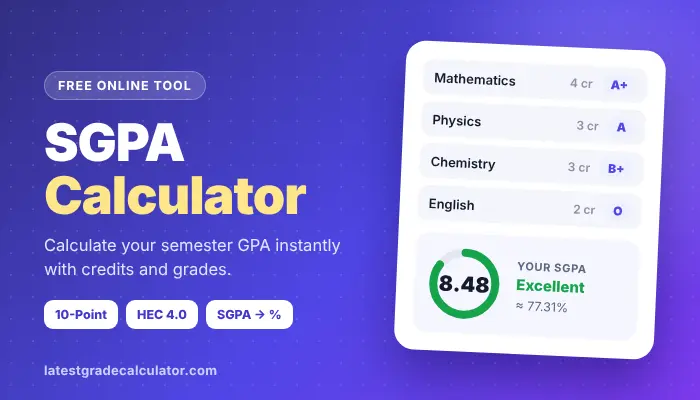
Looking for a faster way to find out your Semester 4 result than it’s officially released? With our free SGPA Calculator, you will have your exact SGPA in seconds. Simply input your subject credits and grades and it does the credit weighted mathematics calculations for you. There’s no sign-up required and it also works with 10-point and HEC 4.0 scales, as well as displaying your equivalent percentage.
SGPA Calculator
Choose your grading scale, enter credits and grades for each subject, then press Calculate.
| Subject | Credits | Grade |
|---|
Must check: High School GPA Calculator
Overview: What Is This Tool?
The Calculator for Semester Grade Point Average (SGPA) is an online, free calculator designed to compute your Semester Grade Point Average in seconds. In the credits section you add the grade for each subject. Calculates weighted math’s and displays your SGPA, total credits, credit point’s % and percentage.
It can be mapped to the 10-point scale of Indian universities (O = Outstanding, A+ = Excellent, A = Good, B+ = Fair, B = Poor, C = Very Poor and P = No Credit) and the HEC 4.0 scale of Pakistani universities (A = Very Good, A- = Fair, B+ = Satisfactory, B = Satisfactory, C = Satisfactory and so on). No downloading or sign-up. It is usable on phones and computers, and will be equivalent to your university’s regular formula.
How to Calculate SGPA (The Core Formula)
The weightage is determined by each subject according to its Credit in SGPA. Grade each of the scores as a grade point, e.g., A+ = 9. Then multiply this grade point by the credits for the subject to calculate the Credit points of the subject. Last, the total credit points are added, then the total credit points are divided by the total: SGPA = Total Credit Points/Total Credits. This means that a 4 credit subject is weighted double that of a 2 credit subject.
Why SGPA Calculation Matters (And Why You Need This Tool)
Your SGPA is a number that represents all your work for a semester. It is utilized by Universities for promotion, scholarships, merit lists, hostel allotment, shortlisting for internships etc. If you know, you can arrange in advance. However, SGPA is not an ordinary average. Not taking into account the credits or dividing by the number of subjects results in the wrong answer. It eliminates that risk with this tool. Allow for credit weighting automatically, and display the working, so it is sure you can trust.
Core Formula Used by the Tool
The calculator uses the official formula for a credit-weighted average:
SGPA = Σ (Credits × Grade Points) ÷ Σ Credits
Σ (sigma) is just an alternative way of saying “add up on all subjects. Multiplies the credits by the points and sums them all, then divides them by the total number of credits. The answer is rounded to two decimal places, as with official transcript. Only those subjects that have credit and a grade are included. The tool will remind you if a row is missing.
Key Features Detailed Breakdown
The SGPA Calculator is easy to use and error-free below. Every feature adds up to a time-saving or common mistake-averting element.
Credit Weighted Calculation Engine
All subjects have the same weight as their credits, which means that subjects with more credits have a greater impact as in your official result. The tool adds up total credit points and total credits, then divides. This helps to prevent rounding errors. It also shows the division, such as 114.5 ÷ 13.5 = 8.48, so you can check it yourself.
Dynamic Subject Rows
Five rows of subjects start in the calculator, as sufficient for a usual semester. To add more rows for electives/lab, click on “+ Add Subject. To delete a row, click on × and the result will update immediately. No restriction to number of subjects.
Multiple Grade Point Scale Support
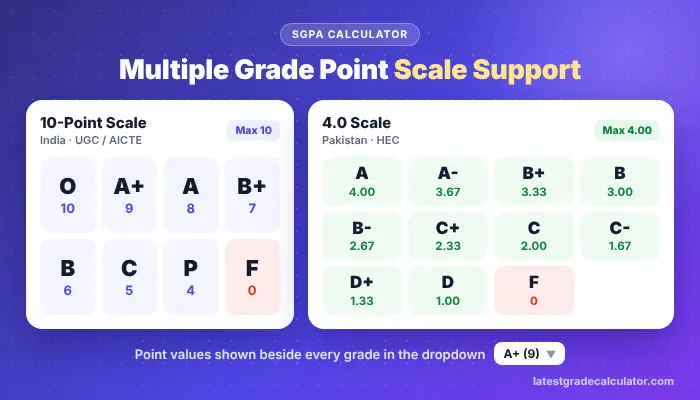
There are two grading systems, which are most commonly used. The 10-point scale (India, UGC/AICTE): O = 10, A+ = 9, A = 8, B+ = 7, B = 6, C = 5, P = 4, F = 0. The 4.0 scale (Pakistan, HEC): A = 4.00, A- = 3.67, B+ = 3.33, B = 3.00, B- = 2.67, C+ = 2.33, C = 2.00, C- = 1.67, D+ = 1.33, D = 1.00, F = 0. The point values are indicated beside each grade listed in the dropdown menu and you never have to look them up.
Real Time Validation
The tool verifies your input while you’re entering it. There may be no negative credits. A subject is only counted if it has credit points >0 and has a grade selected. If there is a missing row, a message informs you. There is a list of grades to choose from — if you enter an impossible grade point, there is no way to save it.
Instant Percentage Conversion (Optional)
Your percentage (SGPA) will appear next to you underneath your SGPA for job and admission forms. It follows the scale of 10 points for which formula is followed by AICTE and many Technical Universities: (SGPA − 0.75) × 10. On the 4.0 scale it uses (SGPA ÷ 4) × 100. Other universities may have other rules, such as SGPA × 9.5. Please always confirm your University’s official formula.
Export & Save
The results are displayed as a clean summary: SGPA, credits, credit points, percentage and the working. If it is not in the instructions, take a screen shot or write it down so that you have a copy. All marks remain private as they are not stored on any server.
Mobile First Responsive Design
The calculator is designed to display results on a mobile device — most students will check results using a mobile phone. Object buttons are easy to tap, there’s no sideways scrolling and the outcome is shown directly below your subjects. It is equally effective on tablet or computer.
Step by Step User Guide (With Example)
The calculator is used in less than a minute. Just keep your result card with you for credit and grade purposes.
Step 1: Choose Your Grade Point Scale
Choose the grading system from “Grading scale” dropdown.
For grades such as O, A+, A, B+ etc. (which are common in India) choose “10-Point Scale”. For grades of A, A-, B+ and B, select “4.0 Scale – HEC Pakistan”. All grade lists will update automatically should you change the scale at a later point.
2: Enter Subject Details:
Type the name of the subject (optional), the credits, and then choose the grade. Each grade option shows its point value, such as “A+ (9)” or “B+ (3.33)”. Put Mathematics for example and 4 credits (and grade A+) will appear.
Step 3: Repeat the process above if necessary (Add more rows)
The calculator has a default of five rows. Click on the “+ Add Subject” link to add another subject. When a subject needs to be removed, click on the × on the end of the row.
Step 4: Click “Calculate SGPA”
Click on “Calculate SGPA” to view your result. You will receive your SGPA (2 decimal places), the total credits and the total credit points as well as the calculation displayed in words.
Step 5 (Optional): Express in Percentage
The percentage is displayed in the result panel. There is no need of an additional switch. It uses (SGPA − 0.75) × 10 on the 10-point scale and (SGPA ÷ 4) × 100 on the 4.0 scale.
Step 6: Adjust or Reset
Credit and grade can be edited and the SGPA will automatically be updated. “what if” checks are easy. To start over with 5 blank rows, click on “Reset”.
Real World Calculation Example
Here is a student’s semester on the 10-point scale:
| Subject | Grade | Grade Point | Credits | Credit Points (GP × Credits) |
| Mathematics | A+ | 9 | 4 | 36 |
| Physics | A | 8 | 3 | 24 |
| Chemistry | B+ | 7 | 3 | 21 |
| English | O | 10 | 2 | 20 |
| Computer Lab | A+ | 9 | 1.5 | 13.5 |
Total credits = 4 + 3 + 3 + 2 + 1.5 = 13.5.
Total credit points = 36 + 24 + 21 + 20 + 13.5 = 114.5.
SGPA = 114.5 ÷ 13.5 = 8.4815, which rounds to 8.48.
Using (SGPA − 0.75) × 10, the percentage is about 77.31%. Enter these subjects in the calculator and you’ll see the same figures.
Why is SGPA Important for Students?
There are many decisions to be made during and after your degree program that will be influenced by your SGPA. It is used by universities to assess if you have the basic requirement to proceed, in compiling merit lists and in granting scholarships/fee concessions. A high SGPA may also help you attain honors, dean’s list recognition or competitive programs for your department.
You also accumulate a SGPA as well as a CGPA, both of which are considered by employers and grad schools. Numerous companies have minimum cut off in terms of CGPA for any campus placement while scholarship programs for higher studies also do the same. Accurately monitoring your SGP on a semester-by-semester basis reduces the chance of falling below these cut-offs, and allows you to recover as soon as possible in the event of a bad semester.
The Problem with Manual SGPA Calculation
It appears simple to compute the SGP by hand but it is very easy to make a small mistake. Students may often add the simple average of the grade points without taking into account the number of credits, or use the number of subjects rather than the number of credits for a grade point average, use the wrong point value for a grade or forget to incorporate a lab or practical course. All of these errors result in a non-official transcript.
Comparing scenarios with manual calculation can also be time consuming. To check how, or the amount, your SGPA will change after your one grade, the entire sum needs to be recalculated. When there are decimals in the mix (like 3.67 or 1.5 credits) it’s easy to get the numbers backwards, particularly when it’s time for an exam.
How Does the SGPA Calculator Work?
The calculator mimics the steps taken by your university, but does them in a flash. First of all, it will take each selected grade and convert it to a grade point using the scale you selected. Second, it then times each grade point by the number of credits that the subject has for credit points.
Thirdly, it adds up all of the credit points and all of the credits, and then it divides to provide your SGPA. All values auto-recalculate when you change them, allowing you to play with them. The result panel displays your SGPA, total credits, total credit points and equivalent percentage, as well as exactly which division you used, allowing you to know if the result is accurate.
SGPA vs CGPA what’s the Difference?
SGPA represents students’ performance in a particular semester whereas CGPA (Cumulative Grade Point Average) represents students overall performance by considering his/her performance in all completed semesters up to that point. In some cases, the CGPA may increase or decrease from semester to semester, however, the CGPA remains stable over time because it is an average of all the semesters.
The same credit weighting is used for calculating CGPA. Each semester’s SGPA is multiplied by the number of credits earned in that semester, the values are totaled together and then divided by the total number of credits earned for all semesters. The more credits in a semester, the more it will affect your CGPA. Every single CGPA makes up your final degree classification and the most applications for jobs require a CGPA.
Who Can Use the SGPA Calculator?
This is a calculator that is helpful to students enrolled in any course under a credit based grading system. It can be used by students of engineering, medical, management, arts, commerce and science, both in the first and the last semester. Works for Undergraduates – BS, BE, B.Tech, BBA and BCA and for postgraduation MS, M.Tech and MBA. It can be used by parents who wish to know what their child has achieved, teachers who need to check a grade sheet and counsellors assisting students in making academic decisions. It will prove useful for students wishing to apply for a scholarship or employment which would require them to submit a semester-wise GPA.
Common Mistakes Students Make with SGPA
The most frequent error made is using a simple arithmetic average of grades without regard to credits, which will overestimate the effect of small classes. Another is to cut by the number of subjects instead of the total number of the credits. These two types of errors can cause your SGPA to move a few tenths of a point.
Students also frequently miss out on lab, practical or seminar courses, or use the grade point scale from the wrong subject, or round the point values for each subject before calculating their total. There is a common confusion of some people between SGPA and CGPA and they give their one number where the other was requested. All these issues can be resolved with the use of the calculator and comparing the result card with the official one.
Tips to Improve Your SGPA
Work on high credit courses first since the grades given in a 4 credit course will shift your SGPA much more than they will in a 1 credit course. Do not take internal tests, quizzes, and assignments lightly. These tests, quizzes and assignments usually account for their major weight in the final grade. It is difficult to make up for small grade losses at the start of the term later in the semester.
Make regular attendance, make a few changes every week (rather than before the tests) and get help from a teacher when a topic is starting to seem tricky. Labs and work will be easy to make top grades on – don’t neglect these. Lastly, practice using the calculator throughout the semester to determine what subjects are most important to achieve your desired SGPA.
Why Students Trust Our SGPA Calculator
Students have confidence in the calculator because it is accurate, transparent and private. It incorporates the same credit-weighted formula used by universities, rounds to 2 decimal places as official transcripts and displays all working allowing you to check each number. The grade tables are standard 10 point and HEC 4.0. It’s also 100% free, never requires a sign-up and stays within your browser. Both the design and the speed are clean on any device, you can view your SGPA as soon as your result is announced, even if your internet connection is slow with a mobile device.
Frequently Asked Questions (Embedded in Tool Page)
Can I use this tool for a 4.0 GPA scale?
Yes. Chose the grading scale (4.0 Scale – HEC Pakistan). It is applied using the same formula which uses weights on the credit, and the result is indicated in the same way as 4.00 is indicated, out of 4.00. The grade points follow the HEC pattern (A = 4.00, A- = 3.67, B+ = 3.33 and so on). A few hundredths may vary if your university uses a different 4.0 table, e.g., A- = 3.70.
What if my university uses letter grades like A, B, C?
It works just like the calculator! Just select your letter grade from the dropdown, and the tool will display the appropriate grade point for the grade scale you chose. The options are marked with their point value in brackets to ensure they correspond to the one listed in your result card grade table.
Does this tool work for pass/fail courses?
Usually, pass/fail courses or non-credit courses are not part of the SGPA and they should not be used in the calculator in most Universities. A failed graded course, on the other hand, is distinct: If it fails you, choose F (you will get 0 graded points), and retain its credits, as these will be included in total credits, and will reduce your SGPA until you pass it. In case you are not sure if your University offers a specific course, please refer to your academic rules.
Can I calculate SGPA for a semester with 20 subjects?
Yes. Select “+ Add Subject” until you have as many subjects as you want. The number of rows is unlimited and the calculation remains immediate, regardless of the number of subjects (five or twenty).
Is my data saved or shared?
NO! All calculations are performed within your browser and NOT a server or even stored by us. Your markings are 100 percent private because the entries are deleted when you leave/refresh the page.
Conclusion
Your SGPA is one of the very important numbers in your academic life and doing it right should be something that won’t take too long. The SGPA Calculator on Latest Grade Calculator calculates an accurate SGPA and percentage from your credits and grades in just seconds, and displays the calculation for your grades. Track your progress with it at the end of each semester and plan the next steps with it in between. The moment you feel like you’re ready for the big picture, use your semester scores along with our CGPA Calculator and stay on track with your educational goals.