Points-Based Grade Calculator is given bellow in detail
Points-Based Grade Calculator
Add the points you earned and the points possible for every assignment. Your percent, letter grade, GPA and pass status update as you type.
Your gradebook
How many points do I need?
Set your goal and how many points are still left to be graded this term.
Grade scale & passing mark
Scales vary by school and syllabus. Set the minimum percent and GPA for each letter to match yours.
| Letter | Min % | GPA |
|---|
How it’s calculated
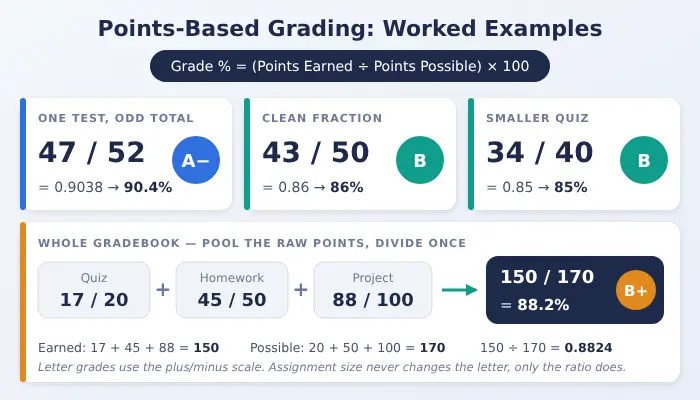
Every point counts the same. A 10-point quiz and a 100-point exam go into one pool, so you never convert each assignment to a percent first. Example: 17/20 + 45/50 + 88/100 = 150 / 170 = 88.2%.
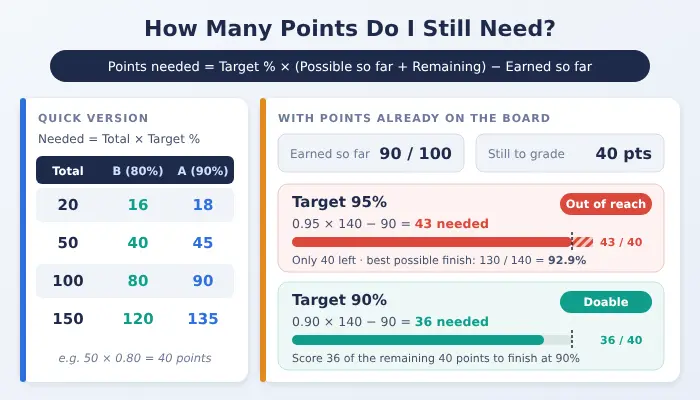
For the planner: points needed = target % × (possible so far + points remaining) − earned so far. Leave ungraded work out of the gradebook, or it counts as a zero.
Results are estimates based on the scale you set. Confirm your official grade with your teacher or school gradebook.
Must Try: Time And Half Calculator
How to use the points-based grade calculator
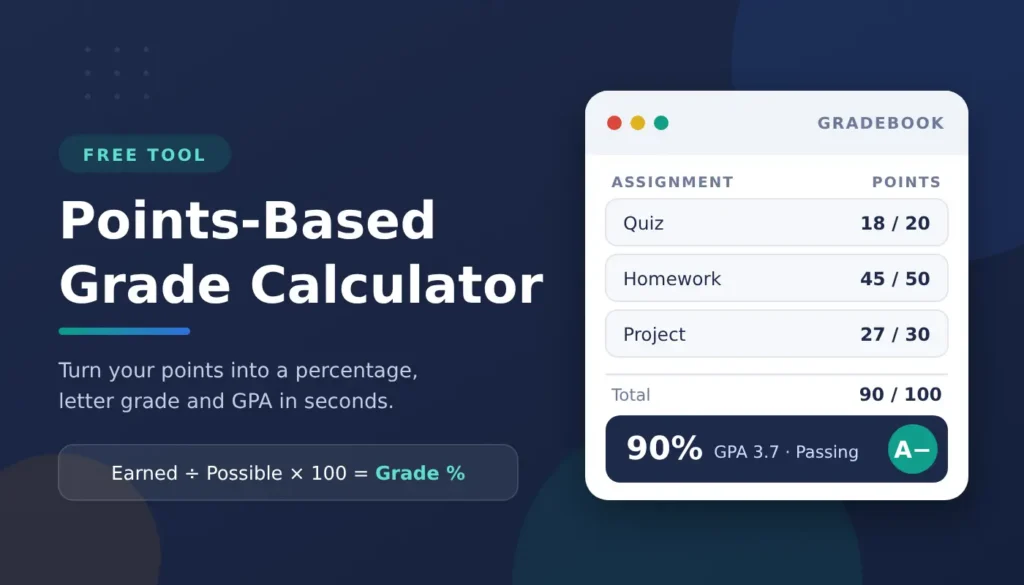
The calculator is pre-programmed with three sample entries – a quiz with 18/20 marks, a homework assignment with 45/50 marks, and a project with 27/30. These add up to 90 points, resulting in a 90% score, an A letter grade and a passing grade. These samples can be removed and replaced with your own, or continue to add rows until you have all the items in your class graded. First, complete the marks you earned with the maximum marks for each assignment. It is up to you to give it a name, but if you label each item, it will be easier to follow the list.
Next, click Add assignment for every other quiz, homework, lab, exam, etc., by creating a new row. The totals for points earned and points possible automatically update as you type. After entering them all, the big result line at the top displays your overall percentage, the correlating letter grade, the GPA corresponding, and whether you are above or below the passing line you selected. For those who wish to go further, input a desired grade and see how much more work it will require to attain, add extra credit provided by the teacher, or customize the scale to match the syllabus.
No information or data is stored or shared, and you can easily log out and start again with a clean gradebook any time you want.
What is a points-based grade?
In a grading system which is based on points, each point is worth the same regardless of the source. Your teacher keeps a record of the points you earned and what each assignment was worth, and calculates your grade by dividing the points by the maximum number of points you could have earned. A little warm-up and a lot of final exam go into the same pool. This is a simple grading system, as opposed to weighted grading, which assigns categories with different weights, or average grading, which takes the average of the individual scores.
Many students are shocked to discover that the size of an assignment will not impact the letter grade of that assignment. An 85% is a B, regardless of the total number of points in the test or assignment, although larger tests or assignments would move your overall average more than smaller ones.
Grade calculator points formula
One line for the grade calculator points formula: Total points earned + total points possible = grade as a percentage.
To find the percentage grade: total points earned / total points possible x 100 This percentage is your overall grade. To “read” it as a letter, refer to the grading scale, and the band-by-band reference table below. Here it is with the numbers plugged in the calculator. In three assignments you scored 90 out of 100 points. Divide: 90 ÷ 100 = 0.90. For extra credit, the formula is the same: multiply by 100 and get an A. There is only one exception: When a grade exceeds 100%, it is an A, but in the case of extra credit, it is applied to the points earned prior to division.
Worked examples: points to percentage and letter grade
Points-to-letter grade reference table
This table will solve the problem of converting your percentage into a letter grade and a GPA; it’s the same 13-level plus/minus scale that’s pre-loaded in the calculator’s scale editor. An additional column indicates the raw score points at which each grade level begins on a 50-point test to demonstrate the cutoffs in both raw scores and percentages.
| Letter | Percentage | Points out of 50 | GPA |
| A+ | 97-100 | 48.5-50 | 4.0 |
| A | 93-96 | 46.5-48 | 4.0 |
| A− | 90-92 | 45-46 | 3.7 |
| B+ | 87-89 | 43.5-44.5 | 3.3 |
| B | 83-86 | 41.5-43 | 3.0 |
| B− | 80-82 | 40-41 | 2.7 |
| C+ | 77-79 | 38.5-39.5 | 2.3 |
| C | 73-76 | 36.5-38 | 2.0 |
| C− | 70-72 | 35-36 | 1.7 |
| D+ | 67-69 | 33.5-34.5 | 1.3 |
| D | 63-66 | 31.5-33 | 1.0 |
| D− | 60-62 | 30-31 | 0.7 |
| F | Below 60 | Below 30 | 0.0 |
On the simple A-F scale the calculator uses by default, an A is 90-100, a B is 80-89, a C is 70-79, a D is 60-69, and an F is anything below 60. When reading the table for a test of any length, multiply the percentage cut by the points possible: If a test has 200 points, then a 90% A is 180 points, and a 25-point quiz is 22.5 points.
Do not use these numbers as a rule, but rather as a default. Each school, class and syllabus has a different grading scale, some use an A grade at 94, some use a 65 as the passing grade and some don’t use plus or minus marks at all. Use the scale editor in the calculator to adjust your own cutoffs, and let your syllabus resolve any that are on the edge of a scale.
How many points do I need? Grade needed on remaining points
Extra credit, bonus points, and half points
A points-based grade can sneak up on you just from a somewhat different percentage point with extra credit, and the calculator is ready for such a point system. If you type your bonus into the extra credit box, it is added to the points earned, it will not be added to the points possible. When you add extra credit, the denominator doesn’t change but so does the numerator, which is how that can help to raise a grade, but never lower.
To remember the two points. Bonus points are NOT equal to bonus percent. The first one is a 50-point test with two bonus points that is equivalent to 4% while the other is flat 2%. The calculator is points based, you should use what you were awarded by your teacher. And determine if you want to limit your grade book to a maximum of 100%. Some do, some run a score to 104% and above, and the real score is displayed by this tool; and the cap is taken from the syllabus.
Half points and decimals are OK as well. An essay that returns at 8.5 points or at 37.5 points on a rubric should be copied as the decimal number, and then Show decimals should be turned to on to keep the decimal point showing in the totals and percentages, or they will be rounded off. The mathematical treatment of 8.5 is the same as that of 9 and it is only divided.
Points-based vs weighted, percentage, average, and GPA
One of the many types of grading is based on points, and if you choose the wrong calculator, you receive a confident but incorrect response. This is what you typically do when grading and your grade shape is not the same as your neighbor or you are not sure what they did.
Weighted grading is a scheme of weighting the work into various categories and assigning each category a percentage of the total, such as 50% for tests and 20% for homework. This is not a grade weight calculator, so if you create a grade weight on your syllabus for each category in the grade, do not use a points based total. When looking for a grade calculator with points and weight, typically it’s not being held on that other page, it’s the weighting.
Peer grading works with a single score, and converts it to a percentage. If you only have one test to convert a percentage grade calculator will be faster. This page is made for many assignments, it is a version with many scores added together and presented on one page.
Average Grading is the average of these individual portions = (Add up each percent – divide by the number of students who had them. That makes every assignment equally viable, not a points value, a 100 point assignment will draw as many stings as a 10 point assignment; it will mean just as much. Use an average calculator when all scores are to be calculated.
This is a different unit again – GPA. The GPA presented here is immediately apparent and is only the GPA of this one class. It’s easy to get a higher weighted GPA by rolling multiple courses into one grade point average, which is where a specialized GPA calculator should come in handy. Grade point calculator is a phrase that is used for both, so it is good to know for each which one you need to use.
There is only one neighbour who has a link as it is truly nearby. In cases where your points are only questions and correct responses, our test grader calculator can create the entire right/wrong answer score sheet for that test in one step.
Common mistakes and edge cases
Against points-based marking, although it is easy to work with several pitfalls are common which will lead to a skewed total, typically at the point’s possible column. If you have not finished an assignment, do not include it in the list; ungraded 100-point final will bring down your percentage to a zero. If your teacher drops the lowest grade, erase that entire row, earned and possible points. No need to worry about combining together assignments of different sizes due to the running total that is implemented without scaling.
Extra credit should not be given for points that were earned or posted in the bonus field but rather added to these points, or the extra credit doesn’t count. Last but not least, round off your percentage only at the end if your teacher rounds it he (which is ok) else don’t. 89.6 can be an 89% or an 89% B+ or an 89% A– depending on how things are done in class. If your grade is right on a grade cut, use your syllabus instead of the calculator.